Citations
A citation is a link, shown with a chatbot's answer, to a file that the answer came from. Citations apply to indexed collections. They let participants check where an answer came from, and open the source file to read more.
When should I use this?
- A policy assistant where staff must confirm the answer against the official policy document
- A support chatbot that links participants to the product documentation file an answer came from
- A research tool where readers need to trace each answer back to the report it came from
What participants see
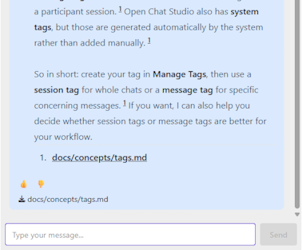
Citations appear as numbered references in the answer. A list of the cited sources, each with its link, appears at the end of the answer.
Turning citations on or off
Citations are controlled by the Generate Citations toggle in the settings of each LLM node that uses an indexed collection. The toggle only appears after you select an indexed collection on the node, and it is on by default. The setting applies to every indexed collection selected on that node.
Turning citations off does not stop the chatbot from searching the collection. The chatbot still answers from your files, but the answer has no source links.
Turn citations off if:
- source links would confuse participants
- you don't want participants to see file names or GitHub repository paths
- you don't want participants to download the contents of uploaded or GitHub files (see What a citation links to)
What a citation links to
Citations work for every file in an indexed collection, whether you uploaded it or synced it from a document source. A document source only changes the citation text and link.
Uploaded files and GitHub files link to a download copy stored in OCS. Participants can open them without access to the repository or an OCS account. Anyone who has the link can download the file. Confluence citations link to the original page. Participants need access to that Confluence space to open it.
Uploaded files are cited by file name. For the citation text and link of each document source, see the document sources quick reference.
See also
- Indexed Collections: what an indexed collection is and how to link it to a chatbot.
- Document Sources: sync files from GitHub or Confluence.
- Local and Remote Indexes: choose where your files are indexed.