Pipelines
What is a Pipeline?
A pipeline is a visual workflow in Open Chat Studio (OCS) that defines how a chatbot processes messages and generates responses. Each step in the pipeline does one specific job, and the steps are connected together to create a complete conversation flow.
What is a Node?
Each step in the pipeline is called a node. A node performs one specific task, such as:
- Calling a large language model (LLM) to generate a response (LLM node)
- Running custom logic or code (Python node)
- Making decisions about which way the conversation should go (Router nodes)
- Sending emails or extracting data (specialty nodes)
Pipelines are visual. You build them by dragging nodes onto a canvas and connecting them with lines. This makes chatbot logic easier to understand and maintain without writing complex code.
A Simple Example
Here's the simplest possible chatbot pipeline — it has just one node:
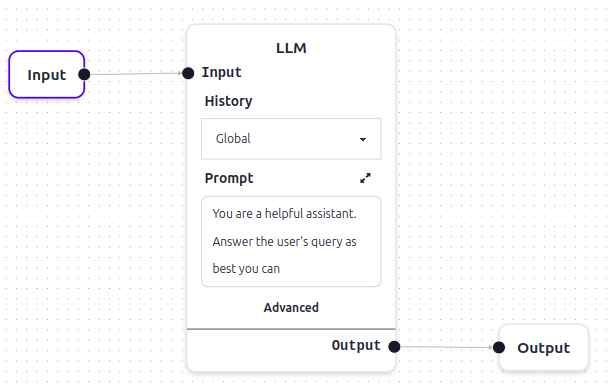
In this simple pipeline:
- A participant sends a message
- The LLM node receives the message and uses AI to generate a response
- The response is sent back to the participant
This is the complete conversation flow for a single-node chatbot.
See Configure an LLM Node for a step-by-step tutorial on building one like this.
Complex Pipelines
Most real-world chatbots are more complex than a single node. They combine several types of nodes to handle different tasks.
Breaking work into separate nodes lets you:
- Keep logic focused and easy to understand
- Reuse nodes across different parts of your pipeline
- Test and modify individual steps without affecting the whole pipeline
- Handle complex workflows without putting every instruction in one AI prompt
Node Types for Complex Pipelines
Common node types include:
-
LLM Node — Processes messages using an AI model. Handles natural conversations, answering questions, and generating responses. Conversation memory is controlled by the history setting.
-
Routing Nodes — Chooses the path the conversation takes, based on message content or on data already known about the participant. Useful for directing different types of questions to different handling logic, or routing on participant attributes like subscription tier. See Router Nodes for the two router types.
-
Python Node — Runs custom code to handle complex logic, fetch data from external systems, process attachments, or manipulate participant data.
-
Render Template Node — Formats responses using templates, allowing you to customize messages with dynamic data.
-
Send Email Node — Sends emails as part of your pipeline, useful for notifications or confirmations.
-
Extract Structured Data Node — Pulls specific information from conversations and structures it for downstream processing.
-
Update Participant Data Node — Saves information about the participant for later use in the conversation.
For worked examples combining these node types, see the Workflow Cookbook.
How a Pipeline Runs
OCS executes your pipeline in organized steps, running nodes in parallel when possible.
When a participant sends a message, OCS processes the pipeline in repeating passes:
Plan → Execute → Update → Repeat
-
Plan: Identify which nodes are ready to run. On the first pass, this is the node(s) directly connected to the participant's input. On later passes, any node whose dependencies have been satisfied is ready.
-
Execute: Run all ready nodes in parallel. Each node processes independently — it cannot see the results of other nodes running in the same pass.
-
Update: Share the results from all nodes so they're available for the next step.
This repeats until all nodes have completed or a maximum step limit is reached.
Running nodes in parallel
Because multiple nodes can execute in the same pass, pipelines naturally support parallel processing. See Parallel Pipelines for details.
Asking the Assistant About a Pipeline
Chat widget context
When you view a pipeline in OCS, the in-app chat widget automatically receives its structure (nodes and connections) and event trigger data as context. You can ask the assistant about the pipeline you are editing, for example what a node does or how the flow is connected. The context updates automatically as you make changes to the pipeline.
Next steps
- Node Types: what each node does and how to configure it.