Consent Forms
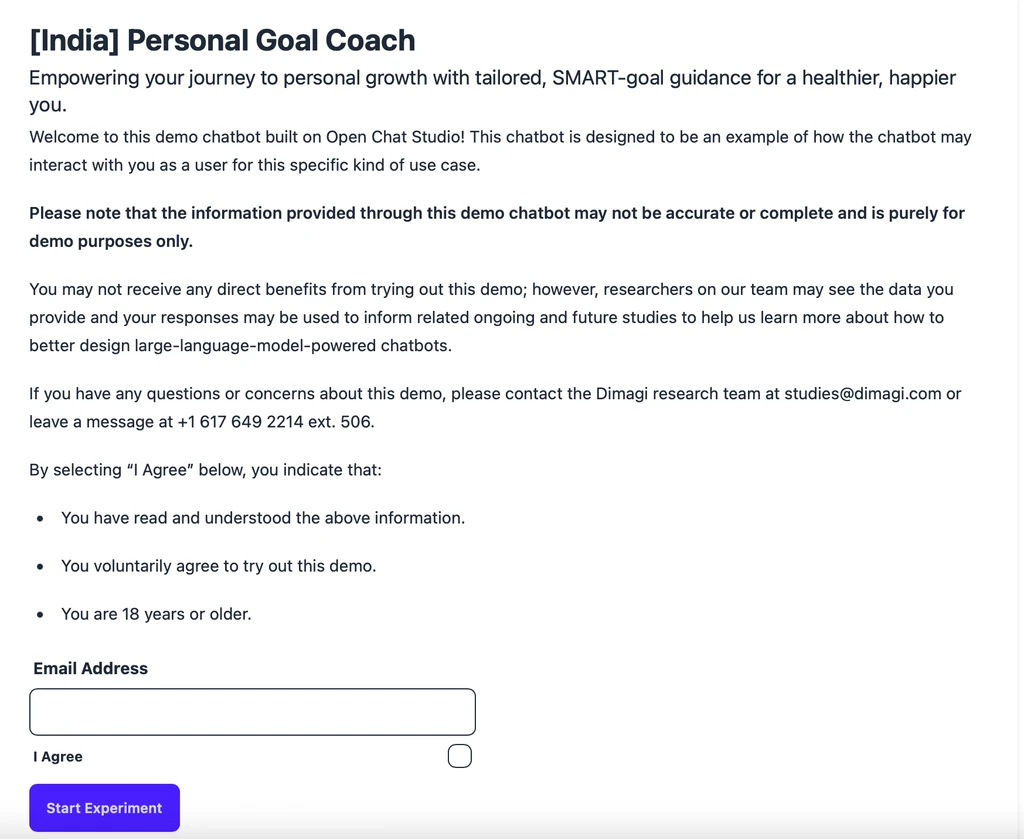
Consent forms let chatbot makers tell participants how their data will be used and who to contact with concerns. Consent forms are displayed to participants before they start interacting with the chatbot.
Using consent forms on WhatsApp, Telegram and other channels
If you deploy your chatbot on WhatsApp, Telegram, or any channel other than Web, enable the Conversational Consent option to include a consent form.
A default consent form is created for each team. You can customize this default form or create new forms by navigating to the "Consent Forms" section of Open Chat Studio.
Consent forms and published versions
When you publish a version of your chatbot, the wording of its consent form at that moment is kept with that version. Editing your working consent form afterwards does not change what already-published versions show. Participants always see the wording that belongs to the version they are chatting with.
To put revised wording in front of participants, edit the consent form and then publish a new version. Participants who consented to the old wording are asked to consent again.
Note
Versions published before September 2026 have no copy of the consent form. They follow the working form until you publish the chatbot again.
What to put in a consent form
Some common elements you may want to include in a consent form are:
- A disclaimer stating that the accuracy of chatbot responses is not guaranteed.
- How you might use data from chatbot interactions.
- An email address and phone number for the relevant team responsible for managing the chatbot.